
Cura for Business
Digital Signage Without the Complexity
Multi-location display management at a fraction of enterprise cost
CURA lets you manage photo and media displays across your business – from a single location to multiple sites – all from your phone or computer.
Real-World Proof: Tennis Club of Rochester
5 displays. 2+ years running. 99% reliability.
The Tennis Club of Rochester has been using CURA to display member photos and event images across 5 screens throughout their facility since 2023.
- Displays turn on automatically each morning
- Content updates remotely – no on-site management needed
- Members love seeing their photos on the walls
- “People stick around more – they love seeing their images up there”
Simple setup. Reliable operation. Happy members.
What CURA Does for Business
Multi-Location Management
Control displays across all your locations from anywhere:
- Update content from your phone while commuting
- Same content everywhere, or different content per location
- No need to visit each site for updates
- Up to 4 phones per account, free on every plan – regional managers can run everything from their own phone without extra seats
Room Sync Across Locations (NEW)
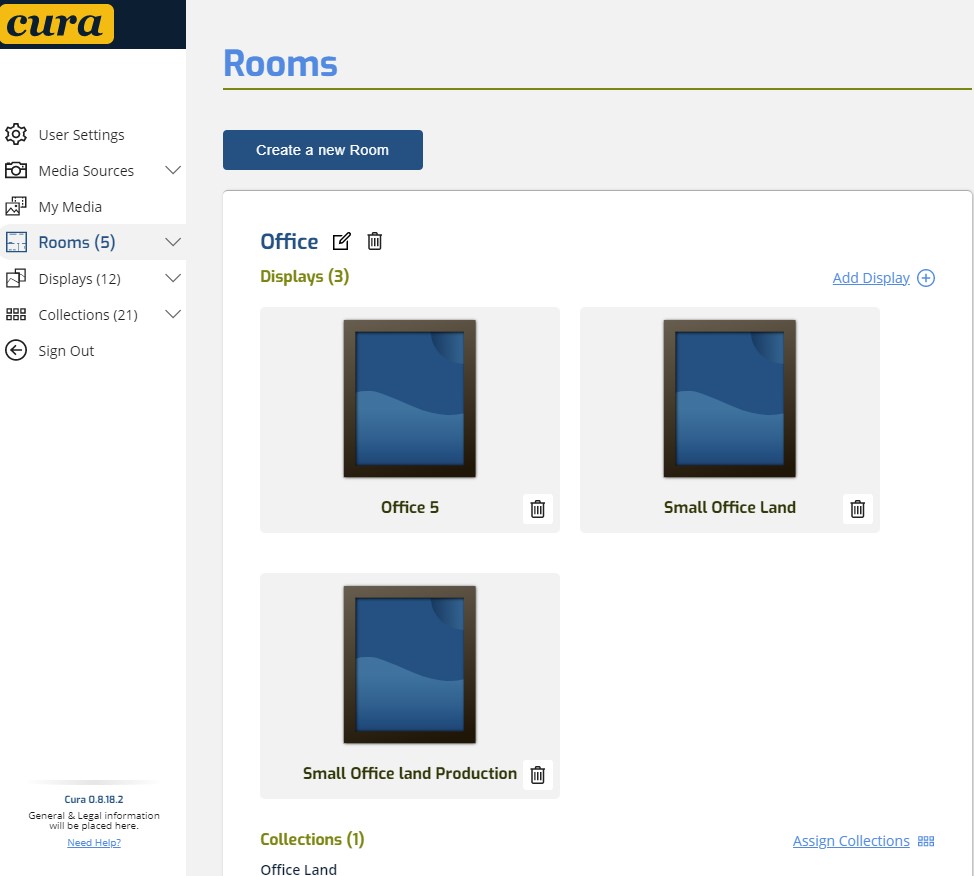
In CURA, a “room” is a logical grouping of displays – not just one physical space. This is powerful for multi-site businesses:
- Retail chain – every entrance display across multiple locations can sync as one “room”, while product areas in each store run their own synced sequence
- Hotels or hospitality – lobby displays across all properties sync to brand content, while room-level displays stay independent
- Galleries & museums – feature gallery wall syncs across branches while individual exhibit rooms stay separate
Ordered playback lets you tell a story across all synced displays. Random playback gives classic shuffle. CURA auto-handles landscape vs portrait so a mix of screen orientations in the same room each shows the right-shaped image.
Scheduling That Works
Set it and forget it:
- Daily schedules – Different content for morning vs evening
- Weekly patterns – Weekday vs weekend content
- Special events – Promotional content for specific dates
- Brightness scheduling – Match store hours
SmartThings Automation (Beta)
CURA’s SmartThings integration turns your displays into part of the space, not just screens on a wall:
- Arrive-at-store routines – First employee arrives, displays light up automatically
- Closing routines – Last person out, all displays power down – no checklist, no forgotten TVs
- Scene-based control – “Event Mode” dims lobby lights, powers all entrance displays, switches CURA to the event collection
- Voice control via Alexa, Google Home, and Samsung Bixby across any CURA display
Works with any CURA display on any supported device – not just Samsung TVs. Join the Beta →
Content Appropriate for Public Spaces
CURA’s safety filters ensure appropriate content:
- Safe – Appropriate for all audiences (default for public displays)
- Filter out any content that shouldn’t be in public view
- Set at room or display level
Easy Content Updates
- Upload new images from any device
- Create collections for different campaigns
- Update instantly across all locations
- No USB drives, no physical media
Use Cases
Retail Stores
- Display product photography
- Seasonal promotions
- Store ambiance with curated art
- Update all locations at once
Restaurants & Hospitality
- Menu photography
- Event promotion
- Ambiance imagery
- Different content for day vs night
Offices & Lobbies
- Company photos and events
- Welcome displays for visitors
- Branded imagery
- Rotating art for ambiance
Why Not Enterprise Digital Signage?
Traditional digital signage means:
- Expensive hardware – Commercial displays cost $1,000-2,000 each
- Costly software – $10-50/screen/month ($100-500/month for 10 screens)
- Professional installation – $250-350 per display
- Ongoing maintenance – $100-500/screen/year
- Total cost – $1,000-5,000 per screen to get started
CURA: Self-Purchase. Self-Install. Self-Manage.
| Traditional | CURA | |
|---|---|---|
| 10 screens software | $100-500/mo | $44.99/mo |
| Hardware | $1,000-2,000/screen | $100-300 consumer TV |
| Media player | $100-600 | $30 Fire Stick |
| Installation | $250-350/screen | DIY – 10 minutes |
| Maintenance | $100-500/yr/screen | None |
| Technical staff needed | Yes | No |
The CURA difference:
- Self-purchase – Buy any TV or use what you have
- Self-install – Download app, sign in, done
- Self-manage – Update from your phone, anywhere
- No IT required – If you can use a smartphone, you can run CURA
If you need photos on screens, not PowerPoints and video walls, CURA is 5-10x cheaper and infinitely simpler.
Hardware Flexibility
Use Any Screen
- Smart TVs (Roku, Fire TV, Android TV, Samsung Smart TVs – Beta, native Tizen app)
- Commercial displays
- Tablets as kiosks
- Any screen with HDMI + streaming stick
Mix and Match
- Different sizes for different spaces
- Portrait or landscape orientation
- Budget screens where appropriate
- Premium displays for focal points
Real Cost Example
| Setup | Hardware | CURA Monthly | Annual Total |
|---|---|---|---|
| 5 screens (32-43″ TVs) | ~$750 | $24.99 | ~$1,050 |
| 10 screens (mixed) | ~$1,500 | $44.99 | ~$2,040 |
| 20 screens (multi-location) | ~$3,000 | $84.99 | ~$4,020 |
Pricing for Business
HOME+ – $14.99/month
For single locations (up to 5 displays)
- 5 displays included
- 3,000 images
- Scheduling
- Safety filters
- Add displays: $5/month each
PRO – $44.99/month
For multi-location businesses
- 10 displays included
- 10,000 images
- Advanced scheduling
- Multi-location support
- Priority support
- Add displays: $4/month each
Need more than 20 displays? Contact us for enterprise pricing.
Getting Started
1. Assess Your Needs
- How many locations?
- How many displays per location?
- What content will you display?
2. Choose Your Hardware
Any smart TV or streaming stick works. We recommend:
- Budget: TCL Roku TV, Insignia Fire TV
- Commercial: Samsung Business TVs
- Flexible: Any TV + Fire TV Stick ($30)
3. Set Up CURA
- Download CURA on each display
- Create collections for your content
- Set up scheduling
- Done – manage everything remotely
Start Your 30-Day Free Trial →
No credit card required.
Frequently Asked Questions
How reliable is it for unattended operation?
Very reliable. The Tennis Club has run 5 screens for 2+ years with 99% uptime. CURA apps auto-launch on power-on (Fire TV, Android TV), and smart plugs can schedule power for full automation.
Can different locations show different content?
Yes. Create different collections for different locations, or use rooms to manage content per-site. Update each independently or push the same content everywhere. Rooms in CURA are logical groupings, not physical spaces – so you can even make a “room” that spans multiple locations (e.g. all entrance displays across your 4 stores sync together, while product areas in each store run independently).
Can CURA work with our smart building systems?
Yes – CURA’s SmartThings integration (beta) lets you wire displays into arrive/leave routines, scene control, time-of-day automation, and voice assistants (Alexa, Google Home, Samsung Bixby). For Samsung Smart TVs, CURA can also power displays on and off on schedule.
What if WiFi goes down?
CURA displays the last loaded image and reconnects automatically when WiFi returns. For critical displays, consider a backup cellular hotspot.
Is content appropriate for public spaces?
CURA’s safety filters ensure only appropriate content displays. Set to “Safe” for public-facing screens, and CURA will filter out anything marked otherwise.
Can I upload videos?
Yes, CURA supports video playback on all native apps (Fire TV, Roku, Apple TV, Android TV, tablets).
Do I need technical staff?
No. If you can use a smartphone, you can manage CURA. Upload photos, create collections, set schedules – all from an intuitive app.
Ready to Simplify Your Displays?
Join businesses like the Tennis Club of Rochester who trust CURA for reliable, simple display management.
Start Your 30-Day Free Trial →
No credit card required. Cancel anytime.
Questions? Contact support@curatortec.com

app sneak peak

Stay up to date on the latest news and to see what’s happening here at CURA!